Connecting to Omnical
Every connection to this server is one of four shapes, and picking the wrong one is the usual confusion — "subscribe" and "CalDAV account" look the same in a calendar app and behave completely differently.
The server: https://0115d8cf.duckdns.org:8443 — everything
lives on it, in one database.
The password is always an app token (minted on your
profile page), never an email password.
Which one do you need?
| You want… | Use | Direction | Who can do it |
|---|---|---|---|
| your calendar in your phone/desktop app, edits both ways | CalDAV client | two-way | HawkBook/DAVx5, Thunderbird, Apple, khal, vdirsyncer |
| your calendar visible in Google/Outlook web, no edits back | ICS subscribe | one-way (in) | Google Calendar web, Outlook web, Apple |
| your calendar pushed into an account on another server (aphy, Google) | push mirror | one-way (out) | the server itself (operator configures) |
| two servers reconciled, edits on either side win | sync hub | two-way | a machine running vdirsyncer |
Read-only beats read-write: if read-only is enough (someone who only needs to see your schedule), subscribe — a leaked subscription link cannot change anything.
The whole picture

The arrows' directions are the contract: clients talk both ways, subscribers only pull, mirrors only push. Nobody can write into this server except CalDAV clients (and guests — below).
1. Connect a CalDAV client — full, two-way
The everyday path: your calendar lives in the app, edits travel back.
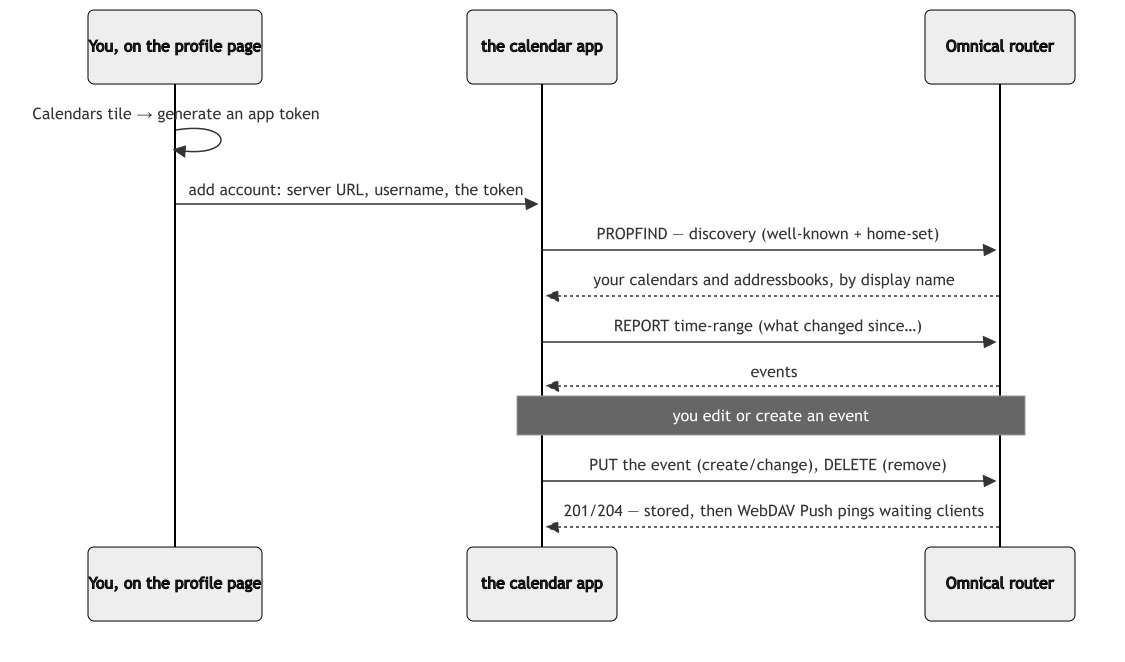
| Field | Value |
|---|---|
| Server / base URL | https://0115d8cf.duckdns.org:8443/caldav |
| Username | your principal id (the email-shaped one you log in with) |
| Password | an app token from the profile page — not your login or email password |
- HawkBook/DAVx5 can use the Nextcloud login flow and generates its own token — no copy-paste.
- Apple skips typing entirely with the profile page's generated configuration profile.
- Sync is near-instant for apps that speak WebDAV Push; everything else polls on its own schedule.
1.1 A guest, on someone else's calendar
Sharing to a person uses the same client path with different credentials: the owner mints a guest share (or per-calendar credentials) on the share page, and hands over exactly one pair:

The privilege minted is the whole permission: view, edit, or admin. Revoke on the owner's share page and the pair stops working at the next request — nothing to recall from the guest.
2. Subscribe — read-only, one-way
For apps that cannot add a CalDAV account at all (Google Calendar web/app, Outlook web) or where read-only is the point. The profile page mints a subscription link; anyone holding it can see, never change:
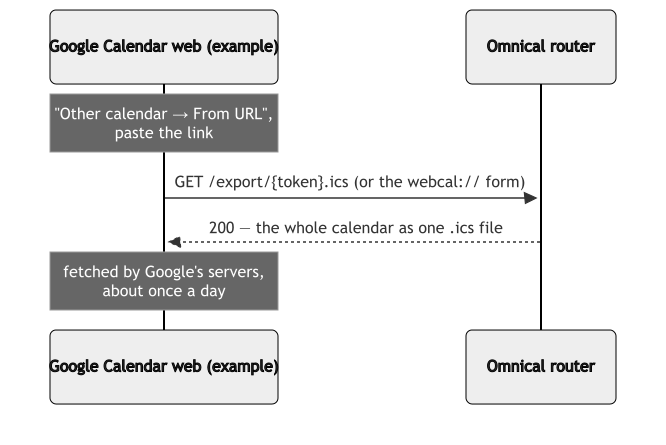
- URL shape: the token is the credential — no username, no password.
- Direction: in, only. Edits made in the app never travel back.
- Fetch: the provider's own servers fetch it — your device never sends anything.
- Refresh: roughly once a day — "it hasn't updated yet" is usually just patience.
- Revocation: revoke on the profile page and the link stops working.
3. Push a calendar out — mirrors
The reverse direction: the server itself copies a local calendar into a collection on someone else's server (aphy, Google). Nothing is installed on the target; the server authenticates like a client would.

One run of the engine, step by step:

The rules that matter:
- One-way. The source calendar is the truth. An edit made on the remote side (in the aphy web, in Google) is silently overwritten by the next push — the mirror is a copy, not a negotiation.
- Ownership. The mirror only ever touches objects it wrote itself. The remote account's native events — invitations it accepted, events its owner made — are never read, changed, or deleted by a sync.
- The target calendar must already exist (Google has no calendar creation over CalDAV — create it in the web UI; a 404 from the target means exactly this).
- Google is OAuth2, not a password: the target carries a client id, client secret and refresh token, exchanged for a bearer token once per run. Both spellings live only in the server's config file.
3.1 The aphy two-calendar layout (why the phone gets its own)

The two calendars answer two clients that cannot share one: the web needs the real masters (or series operations break), the phone needs flat one-shots (or the master lands on the wrong day).
4. Server-to-server, two-way — the sync hub
When both sides must accept edits, a push mirror is the wrong
tool. The pattern that reconciles is a sync client both servers talk
to — vdirsyncer on a desktop, pairing Google and Omnical through a
local folder of .ics files:

- Each pair is independent; the shared folder is the meeting point.
- Conflicts are resolved by the config's rule (the router wins), so an edit on either side converges instead of duplicating.
- This is also the migration tool: it is how Google calendars were originally imported into Omnical.
Mirror vs hub, in one line: a mirror is configured where the truth lives (the server) and copies out; a hub is configured on a third machine and reconciles two truths.
5. What each app can actually do
| App | CalDAV account (full) | Subscribe (read-only) | Notes |
|---|---|---|---|
| HawkBook / DAVx5 (Android) | yes | — | the Android path; Nextcloud login flow |
| Thunderbird | yes | yes | either works |
| Apple Calendar (iOS/macOS) | yes | yes | profile page generates a config profile |
| khal / vdirsyncer | yes | — | CLI; vdirsyncer is the hub engine (§4) |
| Google Calendar (web/app) | no — cannot add an external CalDAV server | yes ("From URL", ~daily) | the reason mirrors exist (§3) |
| Outlook (web/new) | no | yes ("Subscribe from web") | classic Windows Outlook: subscribe only |
Anything in the "CalDAV" column connects via §1; anything not, and you wanted it inside a Google/Outlook account anyway, is §3's reason to exist — push the calendar to them, then their app is just reading its own account.